Vault Dashboard
Vault Dashboard
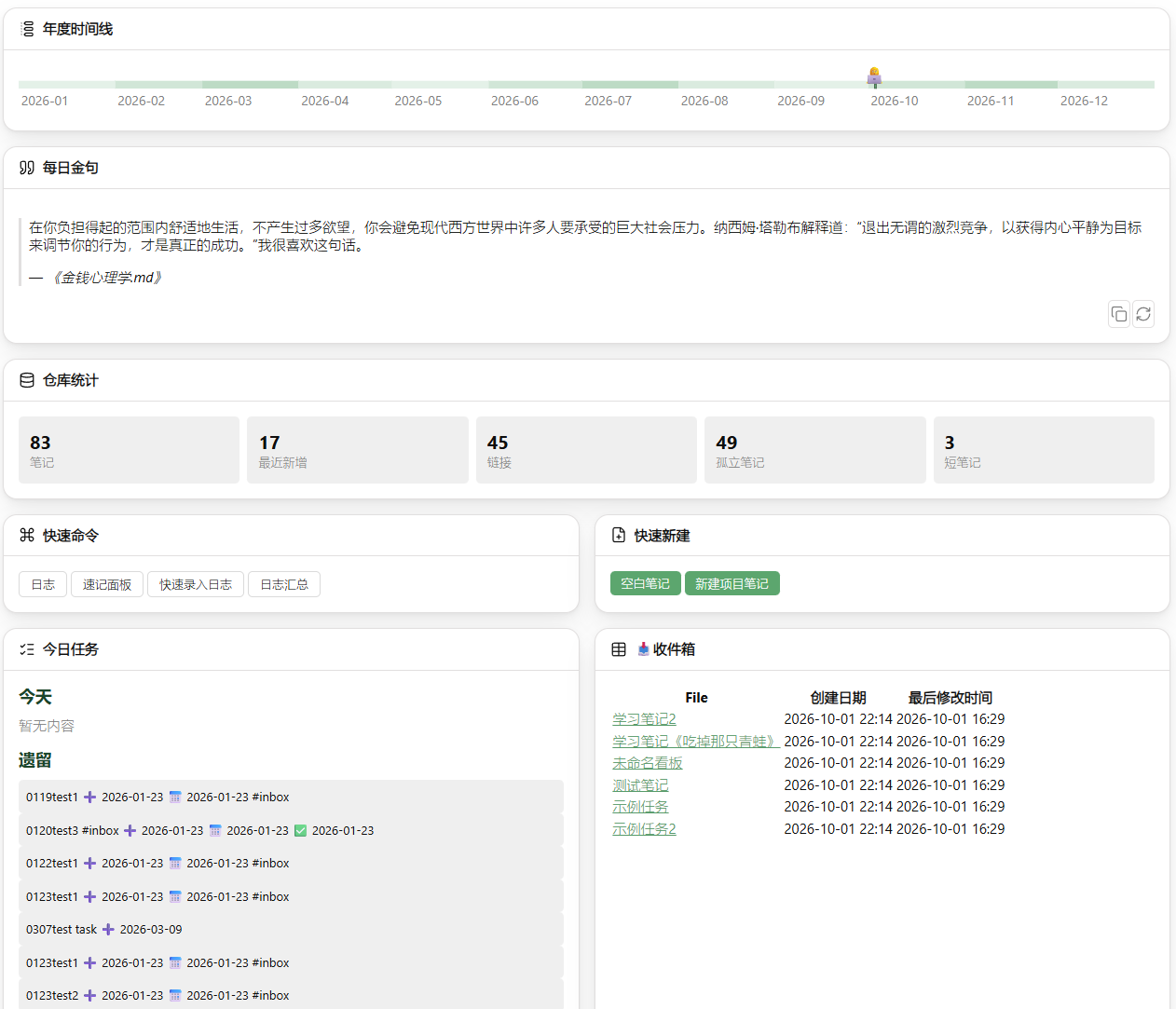
Vault Dashboard summarizes your whole vault into one freely arrangeable start page: the moment you open Obsidian you see your stats, today’s tasks, and your usual entry points — no need to decide “which file do I start from today”.
The page is built from component blocks — stats, tasks, jumps, and charts each live in their own tile. Position and width are fully adjustable, and every change is saved locally on the spot.
Highlights
- 14 built-in components: vault stats, today’s tasks, quick jump, command buttons, quick create, Dataview query, recently created, Base view, random quote, year timeline, word-count trend, activity heatmap, link trend, and structure analysis;
- Four width tiers: every component can take 25% / 33% / 50% / 100% of the row; the grid wraps automatically;
- Read-only workspace mode: click a stat to drill down, click a task to jump to it — you can never accidentally edit a note from the dashboard;
- Historical trends: the plugin records vault snapshots to draw word-count trends and activity heatmaps; history from before installation is estimated from file creation times;
- Optional integrations: Templater, Dataview, and Bases enhance the page automatically when present, and nothing breaks when they’re missing;
- Custom script component (off by default): if you write a little code, a single script can render anything.
Install
Requirements
Obsidian 1.8.7 or newer.
Option 1: BRAT (recommended)
- Install the community plugin BRAT;
- In BRAT’s settings choose
Add Beta pluginand enterluna-jmy/ob-workspace; - Enable Vault Dashboard in the community-plugins list.
Option 2: Manual
- Download
main.js,manifest.json, andstyles.cssfrom the latest GitHub Release; - Put them into
.obsidian/plugins/vault-dashboard/(create the folder if needed); - Restart Obsidian and enable the plugin in settings.
Dependencies
| Dependency | Required? | Used for |
|---|---|---|
| none | ✅ that’s right — zero | all core components work out of the box |
| Templater | optional | the Quick Create component builds notes from Templater templates |
| Dataview | optional | the Dataview Query component runs TABLE / LIST / TASK / CALENDAR queries and dataviewjs |
| Obsidian Bases (built into 1.9+) | optional | the Base View component embeds a .base view |
Quick start
- After enabling the plugin, click the house icon in the left ribbon (or run the command Open workspace);
- The default layout is ready to use: vault stats, today’s tasks, quick jump, and command buttons;
- Want changes? Run Toggle edit mode to add / remove components and adjust widths and parameters — see the guide.