Quick Journal
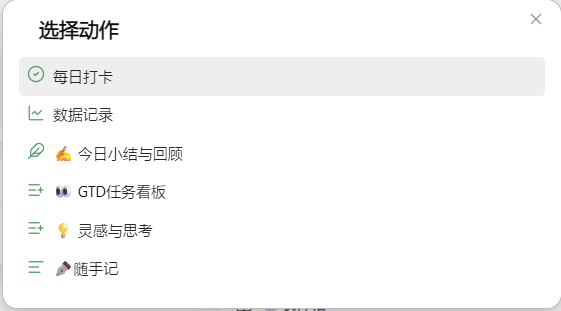
Quick Journal makes journaling nearly effortless: tap a button, fill in a form, and check-ins, numbers, and reflections land in the matching heading of today’s journal — without ever entering Markdown edit mode, doable one-handed on a phone. Weekly / monthly / yearly summary views and review notes live in the same system.
Your journal stays plain Markdown: heading sections + inline fields (field:: value). The plugin reads and writes it — and so does every other tool you own.
Highlights
- Five section types: check-in (✔️/❌ toggles), data (numeric fields), text (one-liners), list (append items, with a configurable line template for tasks), paragraph (one long free-form entry per day) — fully customizable in settings;
- Three entry points: quick capture (each section also has its own command for hotkeys), a Thino-like quick panel content stream, and the journal summary dashboard;
- Multiple periods: day / week / month / year each with their own folder, filename format, and sections; weekly-to-yearly reviews are simply text sections of the matching period;
- Template detection: point settings at your template note and the section config rebuilds itself from it;
- Auto-created notes: a missing target journal is scaffolded from the section config — capture is never blocked by “I haven’t created today’s note”;
- Component-based summary: task chart, check-in ratios, data trends, calendar, heatmaps, recent notes, and query blocks arrange freely — all charts drawn natively;
- Bilingual UI following your Obsidian language by default.
Install
Requirements
Option 1: BRAT (recommended)
- Install the community plugin BRAT;
- In BRAT’s settings choose
Add Beta pluginand enterluna-jmy/ob-quick-journal; - Enable Quick Journal in the community-plugins list.
Option 2: Manual
Download main.js, manifest.json, and styles.css from GitHub Releases, put them into .obsidian/plugins/quick-journal/, and enable the plugin.
Dependencies
None required — parsing, statistics, and the UI are all built in. Dataview is an optional enhancement: the dataview / dataviewjs query blocks you add manually in the summary are rendered by it (without it they show a hint instead).
Quick start
- Enable the plugin and click the ribbon icon (or run Open quick capture);
- Defaults align with the current vault system: journals live in
500 Journal/540 Daily(daily),530 Weekly,520 Monthly, and510 Annual, with five daily sections (check-in / data / reflection / GTD tasks / ideas); - Pick a section → fill the form → submit, and the content lands in today’s note. Want your own structure? Edit the sections in settings or rebuild them with template detection.