Project Master
Project Master
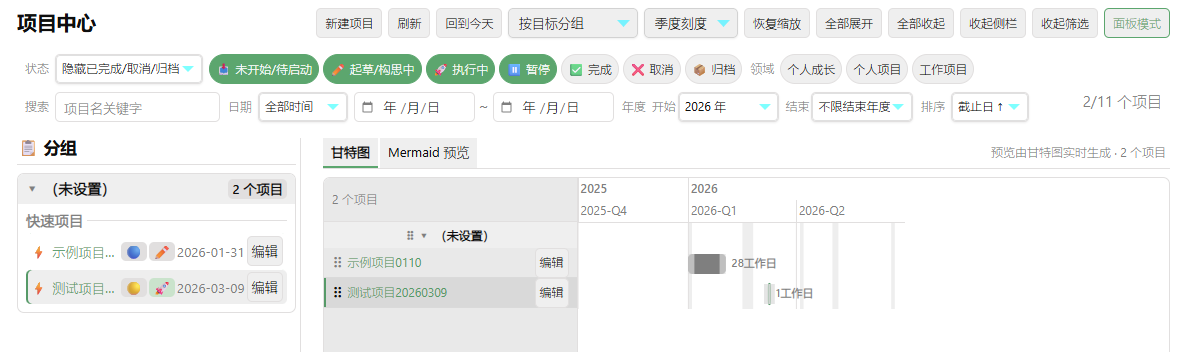
Project Master turns your project notes into an interactive project board: a grouping panel on the left, Gantt and Mermaid views on the right — drag to reschedule, filter across dimensions, and keep long-term projects and milestones in view.
All data comes from your notes’ frontmatter — no database, no changes to your existing note structure. The Gantt chart and the whole UI are drawn by the plugin itself: zero plugin dependencies.
Highlights
- Automatic project detection: notes in the scan folders with
type: projector aprojecttag land on the chart automatically — and every field name can be remapped to your own convention in settings; - Interactive Gantt: drag bars to reschedule (written straight back to frontmatter), multiple zoom levels, a today line, and status / priority coloring;
- Grouping panel: group by folder / status / area and more; cards support drag-to-reorder and a full-page panel mode;
- Multi-dimensional filters: status presets (hiding completed / cancelled / archived by default), area, year, priority — the whole bar collapses when you need the space;
- Create / edit projects: a form-based creator (optionally starting from a template, with a companion
materialsfolder), and click-a-card editing; - Mermaid export: write the chart into a note as a Mermaid
ganttblock, or export SVG / JPG images; holiday-aware scheduling and weekend exclusion included; - Bilingual UI following your Obsidian language by default.
Install
Requirements
Obsidian 1.8.7 or newer, desktop only (not available on mobile — the Gantt interactions are designed for mouse and keyboard).
- Download the latest release from GitHub Releases;
- Put
main.js,manifest.json, andstyles.cssinto<your vault>/.obsidian/plugins/project-master/(create it if needed — the folder must be namedproject-master); - Refresh community plugins in Obsidian settings and enable Project Master.
You can also add the repository luna-jmy/ob-project-center in BRAT.
Quick start
- The default scan folder is
100 Projects(changeable in settings): put your project notes there withtype: projectin frontmatter; - The minimum viable fields are
status+start_date+due_date(see the field reference); - Open the board via the ribbon icon or the command
Open project dashboard.